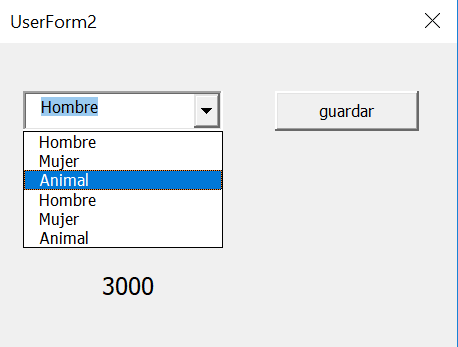
Las categorías son los nombres de la hojas del libro pero al hacer la segunda búsqueda se empiezan a repetir los datos en el combobox1 y en el combobox 2 se muestran los datos de la búsqueda anterior.
Private Sub ComboBox1_Change()
'Cargar lista de combobox1 en combobox2
lista_corresp = ComboBox1.List(ComboBox1.ListIndex)
'Seleccionar hoja
Sheets(lista_corresp).Select
Range("A1").Select
'Anadir los items
Do While Not IsEmpty(ActiveCell)
ComboBox2.AddItem ActiveCell
ActiveCell.Offset(1, 0).Select
Loop
End Sub
Private Sub ComboBox1_Enter()
For h = 2 To Sheets.Count
ComboBox1.AddItem Sheets(h).Name
Next h
End Sub
Private Sub ComboBox2_Change()
Hoja = ComboBox1.Value
Valor = Application.WorksheetFunction.VLookup(Me.ComboBox2.Value, Sheets(Hoja).Range("A:B"), 2, 0)
'Variable valor y función VLookup Me=Formulario/valor del boton, Hoja, Range, columna,verdadero)
Me.Label1.Caption = Valor
End Sub
Private Sub CommandButton1_Click()
'Escribir en la ultima fila - Guardar datos
Sheets("Hoja1").Activate
Range("A" & Cells.Rows.Count).End(xlUp).Offset(1).Select
' ActiveCell = ComboBox2.Value
ActiveCell.Offset(0, 0) = ComboBox1.Value
ActiveCell.Offset(0, 1) = ComboBox2.Value
ActiveCell.Offset(0, 2) = Label1.Caption
End Sub


