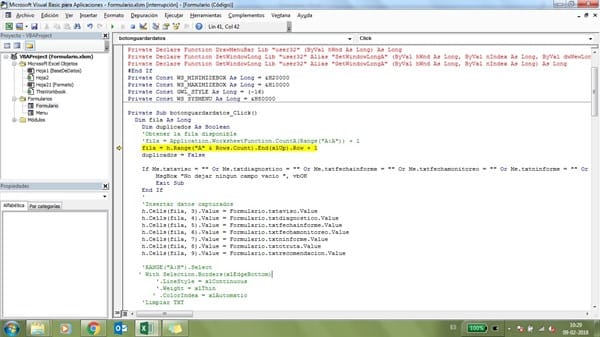
Duda sobre adonde direcciono a que hoja quiero guardar, en este caso hoja BASE DE DATOS
Al guardar datos en la Hoja "Base de datos" pero no se que me quiere decir el error
1 respuesta

No veo si tienes declarada la variable h como global
Debes agregar esta línea en las declaraciones generales (al principio de todo el código)
Dim h
Nota: Además de poner la línea donde se detiene la macro, también debes poner el mensaje de error.

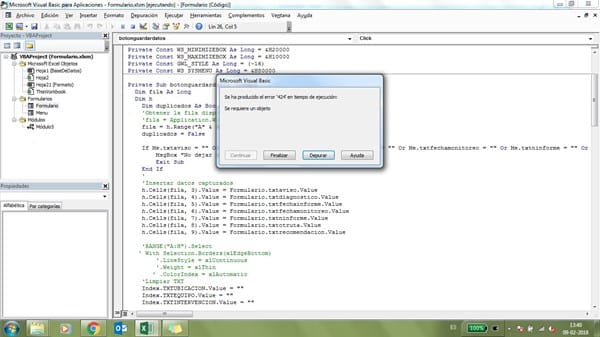
Eh ahí el mensaje que me dice sobre la línea que esta marcada anteriormente
Dim h
Debe ir más arriba
(Al principio de todo el código)
Que sea la primer línea de todo el código
Lo hice, el mismo error me desplegá. Te envíe el archivo
Te faltó establecer la hoja en el evento initialize
Set h = Sheets("BaseDeDatos")
Private Sub UserForm_Initialize()
    Dim hWnd As Long
    Dim lngWstyle As Long
    Dim lngMyHandle As Long, lngCurrentStyle As Long, lngNewStyle As Long
    If Application.Version < 9 Then
        lngMyHandle = FindWindow("THUNDERXFRAME", Me.Caption)
    Else
        lngMyHandle = FindWindow("THUNDERDFRAME", Me.Caption)
    End If
    lngCurrentStyle = GetWindowLong(lngMyHandle, GWL_STYLE)
    lngNewStyle = lngCurrentStyle Or WS_MINIMIZEBOX Or WS_MAXIMIZEBOX
    SetWindowLong lngMyHandle, GWL_STYLE, lngNewStyle
    cbotipomedicion. AddItem "A"
    Cbotipomedicion. AddItem "B"
    Cbotecnica1. AddItem "100"
    Cbotecnica1. AddItem "200"
    Cbotecnica2. AddItem "300"
    Cbotecnica2. AddItem "400"
    Cbotecnica3. AddItem "500"
    Cbotecnica3. AddItem "600"
    Cbotaq. AddItem "1"
    Cbotaq. AddItem "2"
    Cbodescripequipo. AddItem "uno"
    Cbodescripequipo. AddItem "dos"
    Cbocriticidad. AddItem "tres"
    Cbocriticidad. AddItem "cuatro"
    Cboregistroemision. AddItem "edu"
    Cboregistroemision. AddItem "edu1"
    Cboprogramador. AddItem "eduardo"
    Cboprogramador. AddItem "felipe"
    Cbointervencion. AddItem "u"
    Cbointervencion. AddItem "o"
    Cboplanificar. AddItem "X"
    Cboplanificar. AddItem "Y"
    Cboestado. AddItem "Funcionando"
    Cboestado. AddItem "PARADO"
    Set h = Sheets("BaseDeDatos")
End Sub
dim h va hasta arriba:
Dim h
'
#If VBA7 Then
Private Declare PtrSafe Function FindWindow Lib "user32" Alias "FindWindowA" (ByVal lpClassName As String, ByVal lpWindowName As String) As Long
Private Declare PtrSafe Function DrawMenuBar Lib "user32" (ByVal hWnd As Long) As Long
Private Declare PtrSafe Function SetWindowLong Lib "user32" Alias "SetWindowLongA" (ByVal hWnd As Long, ByVal nIndex As Long, ByVal dwNewLong As Long) As Long
Private Declare PtrSafe Function GetWindowLong Lib "user32" Alias "GetWindowLongA" (ByVal hWnd As Long, ByVal nIndex As Long) As Long
#Else
Private Declare Function FindWindow Lib "user32" Alias "FindWindowA" (ByVal lpClassName As String, ByVal lpWindowName As String) As Long
Private Declare Function DrawMenuBar Lib "user32" (ByVal hWnd As Long) As Long
Private Declare Function SetWindowLong Lib "user32" Alias "SetWindowLongA" (ByVal hWnd As Long, ByVal nIndex As Long, ByVal dwNewLong As Long) As Long
Private Declare Function GetWindowLong Lib "user32" Alias "GetWindowLongA" (ByVal hWnd As Long, ByVal nIndex As Long) As Long
#End If
Private Const WS_MINIMIZEBOX As Long = &H20000
Private Const WS_MAXIMIZEBOX As Long = &H10000
Private Const GWL_STYLE As Long = (-16)
Private Const WS_SYSMENU As Long = &H80000
Te falta poner el txt del informe:
Private Sub botonguardardatos_Click()
  Dim fila As Long
    Dim duplicados As Boolean
    'Obtener la fila disponible
    'fila = Application.WorksheetFunction.CountA(Range("A:A")) + 1
    fila = h.Range("A" & Rows.Count).End(xlUp).Row + 1
    duplicados = False
    If Me.txtninforme = "" Or Me.txtaviso = "" Or Me.txtdiagnostico = "" Or Me.txtfechainforme = "" Or Me.txtfechamonitoreo = "" Or Me.txtninforme = "" Or Me.txtotruta = "" Or Me.txtrecomendacion = "" Then
        MsgBox "No dejar ningun campo vacio ", vbOK
        Exit Sub
    End If
    '
    'Insertar datos capturados
    h.Cells(fila, 1).Value = Formulario.txtninforme.Value
    h.Cells(fila, 2).Value = Formulario.txtninforme.Value
    h.Cells(fila, 3).Value = Formulario.txtaviso.Value
    h.Cells(fila, 4).Value = Formulario.txtdiagnostico.Value
    h.Cells(fila, 5).Value = Formulario.txtfechainforme.Value
    h.Cells(fila, 6).Value = Formulario.txtfechamonitoreo.Value
    h.Cells(fila, 7).Value = Formulario.txtninforme.Value
    h.Cells(fila, 8).Value = Formulario.txtotruta.Value
    h.Cells(fila, 9).Value = Formulario.txtrecomendacion.Value
    'RANGE("A:H").Select
   ' With Selection.Borders(xlEdgeBottom)
        '.LineStyle = xlContinuous
        '.Weight = xlThin
       ' .ColorIndex = xlAutomatic
    'Limpiar TXT
'    Index.TXTUBICACION.Value = ""
'    Index.TXTEQUIPO.Value = ""
'    Index.TXTINTERVENCION.Value = ""
'    Index.TXTTERMINO.Value = ""
'    Index.TXTDESCRIPCION.Value = ""
'    Index.ComboBox1.Value = ""
'    Index.ComboBox2.Value = ""
    MsgBox "Datos Correctamente Ingresados"
   ' End With
End Sub
sal u dos
Los combobox no se agregan en la hoja .. solo los TXT
¿Es pregunta?
Esa parte la pusiste tú, solamente estoy complementando las instrucciones que te hacen falta.
- Compartir respuesta

Te formulo otra pregunta - Eduardo Palma