Duda sobre la fecha al modificar me sale con /
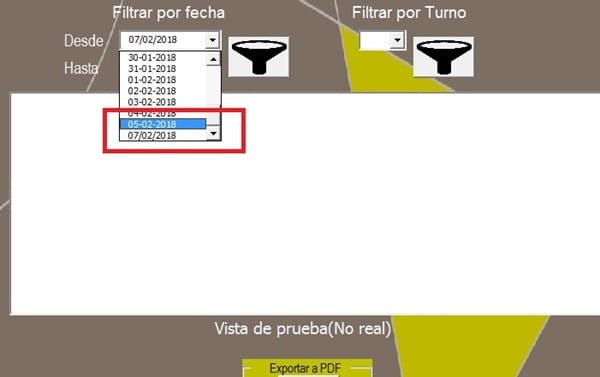
Acabo de modificar la fecha pero me la guarda con el formato con "/" y en el combobox para listar,¿están con "-" que estoy haciendo mal?
1 respuesta

Revisa que en la hoja tengas fechas, entra a la celda para editar y presiona enter, de esa forma se actualizará como fecha.
Revisa en cuál formulario estás poniendo la fecha o cómo capturas la fecha en la celda, debes verificar que siempre se guarde como fecha.
Te cambié la rutina para agregar fechas, de esa forma lo que venga en la fecha lo convertirá a fecha
Sub Agregar_Fec(combo As ComboBox, dato As String)
    Dim fec1 As Date
    Dim fec2 As Date
    fec2 = CDate(dato)
    For i = 0 To combo.ListCount - 1
        fec1 = CDate(combo.List(i))
        If fec1 = fec2 Then Exit Sub
        If fec1 > fec2 Then combo.AddItem fec2, i: Exit Sub
    Next
    combo.AddItem fec2 'Es mayor lo agrega al final
End Sub
sal u dos

Es que en agregar al formulario no hay problema, guarda con "-" el guion, pero al modificar no guarda con el guion , pasa lo mismo que antes cuando listaba
Pero en la modificación no se guarda la fecha en el userform1:
 'Pasar los datos a la hoja
    fila = Val(ListBox1.List(ListBox1.ListIndex, 8))
    h1.Cells(fila, "B") = Val(ComboBox4)        'ptr
    h1.Cells(fila, "C") = TextBox2              'ubic
    h1.Cells(fila, "D") = TextBox3              'equ
    h1.Cells(fila, "F") = TimeValue(TextBox4)   'hi
    h1.Cells(fila, "G") = TimeValue(TextBox5)   'ht
    h1.Cells(fila, "H") = TextBox1              'desc
    MsgBox "Registro actualizado"
Envíame tu archivo y me dices cuál registro tiene el problema para revisar qué está pasando.
Ahorita lo envío, gracias
Te anexo el código actualizado
'////
Dim h1
Private Sub CommandButton2_Click()
    'actualizar datos en la hoja
    If ListBox1.ListIndex = -1 Then
        MsgBox "Debes seleccionar un registro"
        Exit Sub
    End If
    If ComboBox4 = "" Then
        MsgBox "Falta el PTR"
        ComboBox4.SetFocus
        Exit Sub
    End If
    If TextBox2 = "" Then
        MsgBox "Falta el Ubicación"
        TextBox2.SetFocus
        Exit Sub
    End If
    If TextBox3 = "" Then
        MsgBox "Falta el equipo"
        TextBox3.SetFocus
        Exit Sub
    End If
    If TextBox4 = "" Then
        MsgBox "Falta hora termino"
        TextBox4.SetFocus
        Exit Sub
    End If
    If TextBox6 = "" Or Not IsDate(TextBox6) Then
        MsgBox "Falta fecha"
        TextBox6.SetFocus
        Exit Sub
     End If
      'h.Cells(fila, 5).Value = CDate(Index.TXTFECHA.Value)
    '
    'Pasar los datos a la hoja
    fila = Val(ListBox1.List(ListBox1.ListIndex, 8))
    h1.Cells(fila, "B") = Val(ComboBox4)        'ptr
    h1.Cells(fila, "C") = TextBox2              'ubic
    h1.Cells(fila, "D") = TextBox3              'equ
    h1.Cells(fila, "E") = CDate(TextBox6)              'fecha
    h1.Cells(fila, "F") = TimeValue(TextBox4)   'hi
    h1.Cells(fila, "G") = TimeValue(TextBox5)   'ht
    h1.Cells(fila, "H") = TextBox1              'desc
    '
      UserForm1.TextBox1.Value = ""
      UserForm1.TextBox2.Value = ""
      UserForm1.TextBox3.Value = ""
      UserForm1.TextBox4.Value = ""
      UserForm1.TextBox5.Value = ""
      UserForm1.TextBox6.Value = ""
      UserForm1.ComboBox1.Value = ""
      UserForm1.ComboBox2.Value = ""
      UserForm1.ComboBox3.Value = ""
      UserForm1.ComboBox4.Value = ""
      UserForm1.ListBox1.Value = ""
      ListBox1.Clear
    MsgBox "Registro actualizado"
End Sub
'
Private Sub CommandButton3_Click()
'Filtra por turno
    If h1.AutoFilterMode Then h1.AutoFilterMode = False
    ListBox1.Clear
    ComboBox4 = ""  'ptr
    TextBox2 = ""  'ubic
    TextBox3 = ""  'equi
    TextBox4 = ""   'hi
    TextBox5 = ""   'ht
    TextBox1 = ""   'desc
    '
    If ComboBox3.Value = "" Then
        MsgBox "Seleccione un Turno"
        Exit Sub
    End If
    If ComboBox1.Value = "" Then
        fec1 = ""
    Else
        fec1 = CDate(ComboBox1.Value)
    End If
    If ComboBox2 = "" Then
        fec2 = fec1
    Else
        fec2 = CDate(ComboBox2.Value)
    End If
    '
    u = h1.Range("E" & Rows.Count).End(xlUp).Row
    lamisma = False
    For i = 3 To u
        If fec1 = "" Then fec1 = h1.Cells(i, "E"): lamisma = True
        If fec2 = "" Then fec2 = h1.Cells(i, "E")
        If h1.Cells(i, "E").Value >= fec1 And h1.Cells(i, "E") <= fec2 And _
           h1.Cells(i, "A") = ComboBox3.Value Then
            ListBox1. AddItem h1.Cells(i, "A")
            ListBox1. List(ListBox1.ListCount - 1, 1) = h1.Cells(i, "B")
            ListBox1. List(ListBox1.ListCount - 1, 2) = h1.Cells(i, "C")
            ListBox1. List(ListBox1.ListCount - 1, 3) = h1.Cells(i, "D")
            ListBox1. List(ListBox1.ListCount - 1, 4) = h1.Cells(i, "E")
            ListBox1. List(ListBox1.ListCount - 1, 5) = Format(h1.Cells(i, "F"), "hh:mm")
            ListBox1. List(ListBox1.ListCount - 1, 6) = Format(h1.Cells(i, "G"), "hh:mm")
            ListBox1. List(ListBox1.ListCount - 1, 7) = h1.Cells(i, "H")
            ListBox1.List(ListBox1.ListCount - 1, 8) = i    'cargar el número de fila de la hoja
        End If
        If lamisma Then
            fec1 = ""
            fec2 = ""
        End If
    Next
End Sub
Private Sub ListBox1_Click()
    'Cargar los campos
    fila = ListBox1.List(ListBox1.ListIndex, 8)
    ComboBox4 = h1.Cells(fila, "B") 'ptr
    TextBox2 = h1.Cells(fila, "C")  'ubic
    TextBox3 = h1.Cells(fila, "D")  'equi
    TextBox6 = Format(h1.Cells(fila, "E"), "dd/mm/yyyy")  'Fech
    TextBox4 = Format(h1.Cells(fila, "F"), "hh:mm")  'hi
    TextBox5 = Format(h1.Cells(fila, "G"), "hh:mm")  'ht
    TextBox1 = h1.Cells(fila, "H")  'desc
End Sub
'
  Private Sub UserForm_Initialize()
    Set h1 = Sheets("Ingresar")
    For i = 3 To h1.Range("E" & Rows.Count).End(xlUp).Row
        Call Agregar_Fec(ComboBox1, h1.Cells(i, "E").Value)
        Call Agregar_Fec(ComboBox2, h1.Cells(i, "E").Value)
        Call Agregar(ComboBox3, h1.Cells(i, "A").Value)
    Next
    ComboBox4.AddItem "800"
    ComboBox4.AddItem "805"
    ComboBox4.AddItem "806"
    ComboBox4.AddItem "807"
End Sub
Sub Agregar_Fec(combo As ComboBox, dato As String)
    Dim fec1 As Date
    Dim fec2 As Date
    fec2 = CDate(dato)
    For i = 0 To combo.ListCount - 1
        fec1 = CDate(combo.List(i))
        If fec1 = fec2 Then Exit Sub
        If fec1 > fec2 Then combo.AddItem fec2, i: Exit Sub
    Next
    combo.AddItem fec2 'Es mayor lo agrega al final
End Sub
Sub Agregar(combo As ComboBox, dato As String)
    For i = 0 To combo.ListCount - 1
        Select Case StrComp(combo.List(i), dato, vbTextCompare)
            Case 0: Exit Sub 'ya existe en el combo y ya no lo agrega
            Case 1: combo.AddItem dato, i: Exit Sub 'Es menor, lo agrega antes del comparado
        End Select
    Next
    combo.AddItem dato 'Es mayor lo agrega al final
End Sub
'
Private Sub TXTATRAS_Click()
    Unload Me
End Sub
Private Sub UserForm_QueryClose(Cancel As Integer, CloseMode As Integer)
    If CloseMode = 0 Then
        MsgBox ("para salir presione el botón <-")
        Cancel = True
    End If
End Sub
sal u dos
- Compartir respuesta
