Macros para exportar a pdf hojas seleccionadas de un libro de excel
Usé la macros para imprimir varias hojas de un mismo libro y me funcionó, pero quiero que imprima las primeras hojas siempre, es decir que no permita la opción de escogerlas en el check box. Además necesito que la selección también se pueda exportar a pdf.
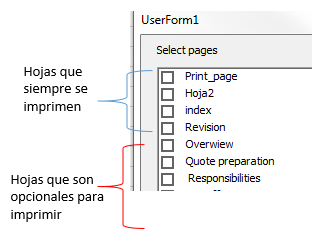

Pon el siguiente código en tu formulario. Lo que hace es generar un archivo pdf por cada hoja seleccionada.
Cambia en esta línea, los nombres de las hojas que siempre quieres que se impriman, te aparecerán en el list como seleccionadas y no podrás desmarcarlas.
Hojas = Array("Print_page", "Hoja2", "index", "revision")Nota: El código empieza con dos variables: hojas y cargando, debes copiar todo el código en tu usreform.
Dim hojas
Dim cargando
'
Private Sub CommandButton1_Click()
'Por.Dante Amor
    ruta = ThisWorkbook.Path & "\"
    For i = 0 To ListBox1.ListCount - 1
        If ListBox1.Selected(i) Then
            h = ListBox1.List(i)
            Sheets(h).PrintOut Copies:=1, Collate:=True
            Sheets(h).ExportAsFixedFormat Type:=xlTypePDF, _
                Filename:=ruta & h & ".pdf", _
                Quality:=xlQualityStandard, IncludeDocProperties:=True, _
                IgnorePrintAreas:=False, OpenAfterPublish:=False
        End If
    Next
    MsgBox "Impresión terminada", vbInformation
End Sub
'
Private Sub ListBox1_Change()
'Por.Dante Amor
    If cargando Then Exit Sub
    cargando = True
    For i = 0 To ListBox1.ListCount - 1
        For j = LBound(hojas) To UBound(hojas)
            If LCase(ListBox1.List(i)) = LCase(hojas(j)) Then
                ListBox1.Selected(i) = True
                Exit For
            End If
        Next
    Next
    cargando = False
End Sub
'
Private Sub UserForm_Activate()
'Por.Dante Amor
    hojas = Array("Print_page", "Hoja2", "index", "revision")
    cargando = True
    ListBox1.MultiSelect = 1
    ListBox1.ListStyle = 1
    For Each h In Sheets
        ListBox1.AddItem h.Name
        For j = LBound(hojas) To UBound(hojas)
            If LCase(h.Name) = LCase(hojas(j)) Then
                ListBox1.Selected(ListBox1.ListCount - 1) = True
                Exit For
            End If
        Next
    Next
    cargando = False
End Sub
Si quieres generar un solo archivo de todas las hojas seleccionas, entonces utiliza este código, el archivo pdf se creará con el nombre "varias.pdf"
Dim hojas
Dim cargando
'
Private Sub CommandButton1_Click()
'Por.Dante Amor
    Dim Pdfhojas()
    Application.DisplayAlerts = False
    ruta = ThisWorkbook.Path & "\"
    arch = "varias"
    n = -1
    For i = 0 To ListBox1.ListCount - 1
        If ListBox1.Selected(i) Then
            h = ListBox1.List(i)
            n = n + 1
            ReDim Preserve Pdfhojas(n)
            Pdfhojas(n) = h
            Sheets(h).PrintOut Copies:=1, Collate:=True
        End If
    Next
    If n > -1 Then
        Sheets(Pdfhojas).Select
        ActiveSheet.ExportAsFixedFormat Type:=xlTypePDF, _
            Filename:=ruta & arch & ".pdf", _
            Quality:=xlQualityStandard, IncludeDocProperties:=True, _
            IgnorePrintAreas:=False, OpenAfterPublish:=False
    End If
    MsgBox "Impresión terminada", vbInformation
End Sub
'
Private Sub ListBox1_Change()
'Por.Dante Amor
    If cargando Then Exit Sub
    cargando = True
    For i = 0 To ListBox1.ListCount - 1
        For j = LBound(hojas) To UBound(hojas)
            If LCase(ListBox1.List(i)) = LCase(hojas(j)) Then
                ListBox1.Selected(i) = True
                Exit For
            End If
        Next
    Next
    cargando = False
End Sub
'
Private Sub UserForm_Activate()
'Por.Dante Amor
    hojas = Array("Print_page", "Hoja2", "index", "revision")
    cargando = True
    ListBox1.MultiSelect = 1
    ListBox1.ListStyle = 1
    For Each h In Sheets
        ListBox1.AddItem h.Name
        For j = LBound(hojas) To UBound(hojas)
            If LCase(h.Name) = LCase(hojas(j)) Then
                ListBox1.Selected(ListBox1.ListCount - 1) = True
                Exit For
            End If
        Next
    Next
    cargando = False
End Sub
'S aludos. Dante Amor. Recuerda valorar la respuesta. G racias

me aparece un error
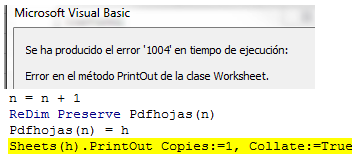
¿Tienes las hojas ocultas?
Si tienes hojas ocultas, entonces utiliza esta:
Dim hojas
Dim cargando
'
Private Sub CommandButton1_Click()
'Por.Dante Amor
    Dim Pdfhojas()
    Application.ScreenUpdating = False
    Application.DisplayAlerts = False
    ruta = ThisWorkbook.Path & "\"
    arch = "varias"
    n = -1
    For i = 0 To ListBox1.ListCount - 1
        If ListBox1.Selected(i) Then
            h = ListBox1.List(i)
            n = n + 1
            ReDim Preserve Pdfhojas(n)
            Pdfhojas(n) = h
            wvis = Sheets(h).Visible
            Sheets(h).Visible = -1
            Sheets(h).PrintOut Copies:=1, Collate:=True
            Sheets(h).Visible = wvis
        End If
    Next
    If n > -1 Then
        Sheets(Pdfhojas).Select
        ActiveSheet.ExportAsFixedFormat Type:=xlTypePDF, _
            Filename:=ruta & arch & ".pdf", _
            Quality:=xlQualityStandard, IncludeDocProperties:=True, _
            IgnorePrintAreas:=False, OpenAfterPublish:=False
    End If
    MsgBox "Impresión terminada", vbInformation
End Sub
'
Private Sub ListBox1_Change()
'Por.Dante Amor
    If cargando Then Exit Sub
    cargando = True
    For i = 0 To ListBox1.ListCount - 1
        For j = LBound(hojas) To UBound(hojas)
            If LCase(ListBox1.List(i)) = LCase(hojas(j)) Then
                ListBox1.Selected(i) = True
                Exit For
            End If
        Next
    Next
    cargando = False
End Sub
'
Private Sub UserForm_Activate()
'Por.Dante Amor
    hojas = Array("Print_page", "Hoja2", "index", "revision")
    cargando = True
    ListBox1.MultiSelect = 1
    ListBox1.ListStyle = 1
    For Each h In Sheets
        ListBox1.AddItem h.Name
        For j = LBound(hojas) To UBound(hojas)
            If LCase(h.Name) = LCase(hojas(j)) Then
                ListBox1.Selected(ListBox1.ListCount - 1) = True
                Exit For
            End If
        Next
    Next
    cargando = False
End Sub
'S aludos. Dante Amor. Recuerda valorar la respuesta. G racias
sí tengo una hoja oculta, usé el nuevo código y ahora marca con amarillo
Sheets(Pdfhojas).Select
disculpa tanta molestia :(
o será más fácil guardar la selección en pdf?
Macro actualizada
Dim hojas
Dim cargando
'
Private Sub CommandButton1_Click()
'Por.Dante Amor
    Dim Pdfhojas()
    Dim HojasOcultas()
    Application.ScreenUpdating = False
    Application.DisplayAlerts = False
    ruta = ThisWorkbook.Path & "\"
    arch = "varias"
    n = -1
    m = -1
    For i = 0 To ListBox1.ListCount - 1
        If ListBox1.Selected(i) Then
            h = ListBox1.List(i)
            n = n + 1
            ReDim Preserve Pdfhojas(n)
            Pdfhojas(n) = h
            wvis = Sheets(h).Visible
            If wvis <> -1 Then
                m = m + 1
                ReDim Preserve HojasOcultas(m)
                HojasOcultas(m) = h
                Sheets(h).Visible = -1
            End If
            Sheets(h).PrintOut Copies:=1, Collate:=True
            'Sheets(h).Visible = wvis
        End If
    Next
    If n > -1 Then
        Sheets(Pdfhojas).Select
        ActiveSheet.ExportAsFixedFormat Type:=xlTypePDF, _
            Filename:=ruta & arch & ".pdf", _
            Quality:=xlQualityStandard, IncludeDocProperties:=True, _
            IgnorePrintAreas:=False, OpenAfterPublish:=False
        Sheets(HojasOcultas).Visible = 0
    End If
    MsgBox "Impresión terminada", vbInformation
End Sub
'
Private Sub ListBox1_Change()
'Por.Dante Amor
    If cargando Then Exit Sub
    cargando = True
    For i = 0 To ListBox1.ListCount - 1
        For j = LBound(hojas) To UBound(hojas)
            If LCase(ListBox1.List(i)) = LCase(hojas(j)) Then
                ListBox1.Selected(i) = True
                Exit For
            End If
        Next
    Next
    cargando = False
End Sub
'
Private Sub UserForm_Activate()
'Por.Dante Amor
    hojas = Array("Print_page", "Hoja2", "index", "revision")
    cargando = True
    ListBox1.MultiSelect = 1
    ListBox1.ListStyle = 1
    For Each h In Sheets
        ListBox1.AddItem h.Name
        For j = LBound(hojas) To UBound(hojas)
            If LCase(h.Name) = LCase(hojas(j)) Then
                ListBox1.Selected(ListBox1.ListCount - 1) = True
                Exit For
            End If
        Next
    Next
    cargando = False
End Sub
'S aludos. Dante Amor. Recuerda valorar la respuesta. G racias
Te invito a SUSCRIBIRTE a mi canal de YouTube:
Ahí encontrarás más sobre Excel y Macros:
https://www.youtube.com/channel/UCs644-v3ti4SF7zE_bt_YXA
Comparte los enlaces con alguien más que desee conocer más sobre Excel o Macros.
- Compartir respuesta
